Archimedia Studios

  • Home
  • Our Company
  • Expertise
  • Blog
  • Contact Us

What is Magnification Ratio?

March 29, 2011

“Magnification ratio” is a technical term in photography. Such ratios are based on size comparisons between real-life subjects and how they are captured on film. Magnification ratios measure the degree in which these comparisons differ. Those falling between the range 1:1 and 4:1 (values to be identified shortly) are usually referred to as “macro photography,” which simply means close-up photography. In reality, a magnification ratio — ungainly as it sounds — measures the photographer’s desire to see the object as it truly is.

Identification

  • A magnification ratio of 1:1, or life-sized, means that a subject that is 1 inch long in real life will also measure 1 inch on film, whereas a 2:1 ratio means that the subject captured will appear twice its size. The numerical sequence moving from life-size to smaller and smaller increments is therefore expressed as 1:1, 1:2, 1:3, 1:4, and so on. Inversely, a magnification ratio of 2:1 or 3:1 means that the subject on film will appear twice or three times its original size.

Significance

  • In close-up photography, the magnification ratio determines the level of detail revealed in the shot. As one moves closer to the subject, the total area recorded decreases, therefore magnifying the level of detail seen. Most 35mm and 50mm lenses can capture a subject at 1:2 magnification.

Effects

  • This works well for small paintings, snapshots, small product work, flowers, and cropped portraits, among other natural objects. Nonetheless, many lenses will require a close-up accessory such as an extension tube, which fits between the camera and the lens, to zoom in beyond a 1:4 ratio

Check the specifications of your lens to find it’s magnification ratio.

Filed Under: Photography

The Most Common Mistakes of the Novice Videographer

March 24, 2011

1. Headhunting–placing every subject in the center of your frame.

2. Motorzooming–overuse of on-screen zooms.

3. Rooting–staying in one spot instead of looking for interesting angles.

4. Firehosing–panning all over the scene.

5. Upstanding–shooting everything from standing eye-level.

6. Snapshooting–taping only two or three seconds per shot.

7. Backlighting–too much light falling on the background instead of on the subject.

Filed Under: Filmmaking

Photo tips on the Direction of Light

March 21, 2011

The direction of light describes where the light source is in relationship to you and your subject. It can change the look of your subject dramatically and therefore requires you to adjust your metering techniques somewhat. In the sections that follow, What follows is a description of light based on the direction it’s coming from and make some suggestions for using it.

How you choose to use the direction of light depends on which of the attributes of that particular light may or may not suit your purpose for a given image

Frontlight

You have frontlight when the light source is on the same side of your subject as you are, like when the sun is behind you or when the flash on your camera goes off.

Following are the characteristics of frontlight:

  • It’s very even.
  • It doesn’t add contrast to the subject.
  • It shows colors and shapes well (unless the shapes are three-dimensional).
  • It’s good for a variations in subject tonality.
  • It usually minimizes texture.
  • It can make subjects look flat and two-dimensional.
  • It can be boring unless you have a subject with strong variations in color or tonality.

Frontlight isn’t great in all situations, but when it’s soft, it’s the best light for minimizing imperfections in human skin. (Now you know why they put that huge light in front of you when you got your school pictures back in the day.)

Avoid taking photos of people when they’re facing the sun. It may be frontlight, but it’s too harsh.

Even though the majority of people take lots of front-lit photos, you’ll be a better photographer, hone your exposure skills more quickly, and have more dramatic images if you take a higher percentage of backlit and side-lit photos.

Sidelight

If the sun or light source is to the side of your subject, you have sidelight – half the subject is lit and half is in shadow. The mix of light and shadow increases the contrast in the subject. The characteristics of sidelight are as follows:

  • It’s dramatic.
  • It can cast long shadows when the sun is low in the sky.
  • It makes subjects more three-dimensional.
  • It’s great at revealing texture.
  • It can reduce the amount of color information.
  • It’s harder to meter than frontlight.

Landscape photographers love sidelight, especially warm sidelight when the sun is low across the sky, because it creates long shadows across the frame.

Some subjects tend to lack color interest, but they really pop with the contrast between light and shadow that sidelight creates.

Backlight

You have backlight when the sun or other light source is behind your subject. It’s bold and dramatic, but it’s also a challenge to work with. Never fear, though. The photos you get when you use backlight are totally worth it.

Following are the characteristics of backlight:

  • It creates dramatic contrast.
  • It can significantly reduce the color information in your subject.
  • It emphasizes shapes (so it’s better for when you want shapes to take priority over color).
  • It can create dramatic rim lighting (a bright halo of light around your subject) when the sun is directly behind the subject.
  • It creates a fresh look because most people rarely try backlighting.
  • It can be used to create silhouettes.
  • It darkens unlit areas of the subject.
  • It’s the most challenging type of light meter.

Filed Under: Photography

Stay Ahead of your Competition – Facebook Advertising Tips

March 17, 2011

As with most things in life, to get ahead of your competition you only need to do a couple of things different to them to make a big difference. It’s no different with Facebook advertising and here are a few small tweaks you can make to your next campaign that can make a real difference to your end result.

Tip #1

This first tip is so obvious you’ll wonder why I’ve included it, but it is amazing how many people don’t do this when using Facebook advertising. Always have a call to action on your Facebook ads. That’s means words to tell your user to take an action. For example, Click here, Call us today, Like us. These are all simple calls to action, and without these you will find your ads tend to have a lower click through rate.

Tip #2

When you create your ad, set it up to use cost per click, not cost per impression. Cost per click means you only get charged when someone physically clicks on your Facebook ad. Cost per impression means you get charged per 1000 impressions and the rate for this is much lower than cost per click. However if you’re new to Facebook advertising and your ads don’t have a high click through rate but do get lots of impressions, you’ll quickly find that changing to cost per click will save you a lot of money.

Tip #3

Facebook have a recommended bidding range when you create an ad. This means the price is for example between 0.30 – 0.70 per click. Try setting your bid to somewhere in the middle of this range when you create your ad. Then work out what your click through rate is. Your click through rate is the percentage of people who click on your ad, compared to the number of impressions. If you can improve your click through rate by changing parts of your ad and split testing, then Facebook will reward you by giving your ad more impressions.

Tip #4

Once you’ve managed to increase your click through rate by split testing your ads, try lowering your bid price. A good click through rate is roughly between 13% – 20%. The reason you should do this is because Facebook advertising reward a good click through rate with more impressions. So you can get the same number of impressions and clicks by lowering your bid price!

Tip #5

When you select your bid price don’t select obvious amounts like 0.25, 0.30, 0.35 etc. Try 0.26 or 0.31 as not as many people will bid on these prices.

These tips are all very small tweaks you can make to your Facebook advertising campaigns. They can really increase the effectiveness of your ads and keep you ahead of your competition. However be sure that you only include them as part of your overall split testing strategy.

Filed Under: Social Media Marketing

How to find Facebook User Demographics and Totals By City

March 9, 2011

Are you missing out on opportunities to connect with potential customers on Facebook?

There is a very quick and simple way to discover user demographics according to city on Facebook. Follow these steps to find out how:

  1. Log into Facebook and click on the Ads and Pages button in the left column of the screen. Next, click the “Create An Ad” button. If you have already created an ad in the past, it will be a large green button on the upper right side of the screen. If not, it is a gray button toward the lower left side of the page.
  2. On the next screen, in the “Destinations” section select your “Page Name” from the dropdown menu
  3. Next, you will select the demographics information you are interested in. You are able to select according to city, age, marital status, etc.
  4. If you want to see the demographics of your current fan base: Scroll down to the “Connections on Facebook”:  section. Look for Connections, select “Only people who are fans of (your page name)

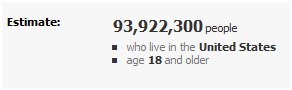
Scroll down  the page, you will see your estimates in the right column that look something like this:

Changing demographic options can  easily give you a current assessment of your fan base for marketing purposes or assist marketing efforts directed at a new audience.

Filed Under: Social Media Marketing

  • « Previous Page
  • 1
  • …
  • 31
  • 32
  • 33
  • 34
  • 35
  • …
  • 54
  • Next Page »

Delivering Customer Experience Excellence

Let's give em' something to talk about!

Contact Us

Copyright © 2026 · Archimedia Studios · Privacy Policy